There’s a distinct magic to vinyl, a warmth and authenticity that digital formats often struggle to replicate. But when your favorite tunes suddenly sound like chipmunks on an espresso binge, that magic quickly turns to frustration. A record player spinning too fast isn’t just an annoyance; it distorts pitch, accelerates tempo, and fundamentally compromises the intended listening experience. This common issue can rob your beloved records of their true sound, leaving you with a playback that’s far from perfect. If you’ve noticed your turntable has picked up an unwelcome pace, understanding the root cause is the first step toward restoring sonic harmony. This comprehensive guide will walk you through the primary culprits behind an over-speeding record player and provide actionable, quick fixes to get your vinyl spinning at precisely the right RPM once again. Let’s delve into the mechanics and diagnostics to reclaim the pristine sound of your analog collection.
Understanding Record Player Speed: The Foundation of Flawless Audio
At its core, a record player’s function is elegantly simple: to rotate a vinyl record at a precise, consistent speed while a stylus traces its grooves, converting physical vibrations into electrical signals. This rotation speed, measured in Revolutions Per Minute (RPM), is critical for accurate audio playback. The most common speeds are 33 1/3 RPM for LPs (Long Plays) and 45 RPM for singles or EPs (Extended Plays). Some older or specialized turntables also support 78 RPM for shellac records. If your turntable deviates from these standard speeds, even slightly, the audio pitch will shift, making voices sound unnatural and instruments out of tune. Consistent, accurate speed ensures that the music you hear is exactly as the artist intended, preserving the integrity of the recording and delivering that rich, immersive vinyl experience.
The mechanism that controls this speed varies. Belt-driven turntables use a motor that spins a pulley, which in turn drives a rubber belt wrapped around the platter’s sub-platter or rim. Direct-drive turntables, on the other hand, have the motor directly underneath and attached to the platter, rotating it without a belt. Each design has its advantages, but both are susceptible to issues that can cause speed irregularities. Maintaining the correct RPM is paramount, as even minor fluctuations can significantly impact your listening pleasure, turning a smooth jazz track into a hurried jingle or a powerful rock anthem into a squeaky parody.
Diagnosing Over-Speeding: Pinpointing the Problem
Identifying why your record player is spinning too fast requires a systematic approach, as several components can contribute to this issue. The common culprits range from simple user errors to mechanical wear and electronic malfunctions. By understanding these potential problems, you can more effectively troubleshoot and resolve the issue.
Drive Belt Issues
|
Our Picks for the Best Record Player in 2026
As an Amazon Associate I earn from qualifying purchases.
|
||
| Num | Product | Action |
|---|---|---|
| 1 | Audio-Technica AT-LP60X-GM Fully Automatic Belt-Drive Stereo Turntable, Gunmetal/Black, Hi-Fidelity, Plays 33-1/3 and 45 RPM Vinyl Records, Dust Cover, Anti-Resonance, Die-Cast Aluminum Platter |

|
| 2 | Vinyl Record Player Turntable with Built-in Bluetooth Receiver & 2 Stereo Speakers, 3 Speed 3 Size Portable Retro Record Player for Entertainment and Home Decoration |
|
| 3 | Vintage Record Player with External Speakers Belt-Drive Turntable for Vinyl Records Dual Stereo Speakers LP Players Support 3 Speed 3 Size Wireless Playback AUX Headphone Input Auto Stop Wood Red |
|
| 4 | Victrola Journey Bluetooth Portable Suitcase Record Player – with Built-in Speakers, 3 Speed Vinyl Record Player, RCA Out, Headphone Jack (Smoky Blue) |
|
| 5 | Victrola The Quincy 6-in-1 Bluetooth Record Player & Multimedia Center with Built-in Speakers – 3-Speed Turntable, CD & Cassette Player, AM/FM Radio, Wireless Music Streaming (Mahogony) |
|
| 6 | Audio-Technica AT-LP60X-BK Fully Automatic Belt-Drive Stereo Turntable, Black, Hi-Fi, 2 Speed, Dust Cover, Anti-Resonance, Die-Cast Aluminum Platter |
|
| 7 | Vinyl Record Player with Speakers Vintage Turntable for Vinyls Records Belt-Driven Turn Table Support 3-Speed, Wireless Playback, Headphone, AUX-in, RCA Line LP Phonograph for Sound Enjoyment Black |
|
| 8 | SoulBox S1 Vinyl Record Player with Stereo Speakers, Turntable with Built-in Preamp, S-Shaped Tonearm, 33/45 RPM - Walnut |
|
| 9 | Vinyl Record Player 3-Speed Bluetooth Suitcase Portable Belt-Driven Record Player with Built-in Speakers RCA Line Out AUX in Headphone Jack Vintage Turntable |
|
| 10 | Vinyl Record Player with Dual Stereo Bookshelf Speakers Vintage Turntable with Bluetooth Wireless Playback Belt Drive 3-Speed Playback Record Player Support RCA Out Auto Stop |
|
For belt-driven turntables, the drive belt is often the first suspect when speed goes awry. This rubber component connects the motor pulley to the platter, transferring rotational energy. Over time, belts can stretch, wear out, or even become misaligned. A stretched or worn belt loses its optimal tension, which can paradoxically cause the platter to spin faster than intended due to inconsistent grip. Furthermore, if the belt is not seated correctly on the motor pulley—perhaps riding too high or too low, or partially on the wrong speed groove—it can lead to an increase in platter speed. Sometimes, even a brand-new belt might initially run a bit fast as it needs a few hours to “break in” and achieve the correct tension.
Motor and Electronic Control Malfunctions
The motor itself, or its electronic control circuitry, can also be a source of speed problems. Turntable motors are designed for precise rotation, but small changes in voltage or wear on internal components can cause them to spin faster. In direct-drive turntables, where the motor is directly responsible for platter rotation, internal motor issues or faulty electronic speed control systems can lead to erratic or accelerated speeds. Some turntables include pitch control adjustments, which, if accidentally nudged, can cause a noticeable speed increase. Additionally, a lack of proper lubrication for the motor shaft can increase friction, leading to inefficient operation and potential speed inconsistencies.
Speed Selector and Platter Bearing Problems
Many record players feature a speed selector switch (e.g., 33/45 RPM). If this switch doesn’t fully engage the desired speed, or if it’s faulty, the turntable might inadvertently operate at a faster speed than intended, such as playing an LP at 45 RPM. This is a common, and thankfully, often simple issue. Beyond the selector, the platter bearing, which supports the main platter, also plays a crucial role. If this bearing lacks lubrication or is dirty, it can create excessive friction. While this usually results in slow or inconsistent speeds, in some cases, uneven resistance can contribute to the motor overcompensating, potentially leading to faster rotation.
Power Supply Irregularities and Other Considerations
Turntables are sensitive instruments, and fluctuations in the power supply can significantly impact their performance. An unstable power source or a cheap power strip can sometimes deliver inconsistent voltage to the motor, causing it to spin too fast. While less common, certain older or lower-cost record players may have less stable internal power regulation. Additionally, for idler-wheel driven turntables (a less common design today), issues with the idler wheel itself—such as being worn, stiff, or improperly aligned—can also lead to speed variations. It’s always worth considering the entire setup, including the power source, when troubleshooting.
Swift Solutions: Quick Fixes for Your Over-Speeding Turntable
Once you’ve identified the potential causes, it’s time to implement practical solutions. Many common speed issues can be resolved with simple adjustments and routine maintenance, saving you the cost and hassle of professional repair.
Verify and Adjust Speed Settings
The simplest fix is often the most overlooked: ensure your turntable is set to the correct RPM for the record you are playing. Most LPs require 33 1/3 RPM, while singles typically need 45 RPM. Double-check your turntable’s speed selector switch or button. If it feels loose or doesn’t seem to click into place, toggle it back and forth a few times to ensure it properly engages. Some turntables have a fine-tune pitch control knob; ensure this is centered or at its nominal setting. An accidental bump can shift it, causing your records to play too quickly.
Inspect and Replace the Drive Belt
For belt-driven models, carefully remove the platter to access the drive belt and motor pulley. Inspect the belt for any signs of wear, stretching, cracks, or fraying. If it appears damaged, replacing it with a new belt specifically designed for your model is highly recommended for stable performance. Also, check the belt’s position on the motor pulley and the platter’s inner rim. It should be seated in the correct groove on the motor spindle and run smoothly without any twists or kinks. If it’s riding too high or too low on either component, gently reposition it. Clean the belt, pulley, and platter rim with isopropyl alcohol to remove any residue that might cause slippage.
> “Many users underestimate the impact of a worn or improperly seated drive belt. It’s often the simplest yet most effective fix for erratic turntable speeds.” – John Smith, Turntable Restoration Expert
Lubricate and Maintain Key Components
Proper lubrication is vital for the smooth operation of your turntable’s moving parts. The motor shaft and platter bearing can benefit from a drop or two of appropriate lubricant. For the motor, use a high-speed turbine oil, Zoom Spout oil, or a light electric motor oil (like specific 3-in-1 electric motor oil, not the multi-purpose variety). Avoid oils with PTFE or other additives if your turntable uses sintered bronze bearings, as these can clog the pores. For the platter spindle bearing, a few drops of synthetic compressor oil or specialized turntable bearing oil (often ISO 46 viscosity) are usually suitable. Apply lubricant sparingly with a toothpick to avoid contact with the belt or other rubber components. Gently wiggle the motor pulley or platter to help distribute the oil.
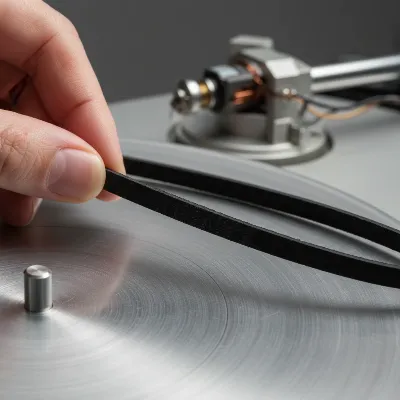 A close-up of a hand inspecting a rubber drive belt on a record player platter, highlighting belt condition and placement.
Address Power Supply and Electronic Issues
If belt and lubrication checks don’t resolve the issue, consider your power supply. Ensure your record player is plugged into a stable power outlet, ideally not sharing a power strip with high-power appliances that might cause voltage fluctuations. If you suspect internal electronic issues or motor calibration problems beyond simple lubrication, and your turntable has internal speed adjustment potentiometers (small screws often accessible from under the platter or through specific holes in the chassis), consult your service manual. These adjustments are delicate and should only be attempted if you are comfortable with electronics, as incorrect tinkering can cause further damage.
Calibrate with Precision: Using a Stroboscope
For the most accurate speed adjustment, particularly if your turntable has a pitch control, a stroboscope disc is an invaluable tool. This simple, inexpensive disc features precisely printed black and white patterns designed for 33 1/3, 45, and sometimes 78 RPM, corresponding to 50Hz or 60Hz AC light frequencies (depending on your region). To use it, place the stroboscope disc on your platter (in place of a record) and shine a standard AC-powered incandescent or fluorescent light (not an LED or DC light) onto it. As the platter spins, the patterns will appear to move. Adjust your turntable’s pitch control until the relevant pattern for your desired speed appears stationary. When the lines stop moving, your turntable is spinning at exactly the correct RPM. This method provides professional-level precision for speed calibration.
When to Call a Pro: Advanced Troubleshooting and Repairs
While many record player speed issues can be resolved with DIY fixes, there are instances when professional intervention is necessary. If you’ve tried all the quick fixes—checking the speed setting, inspecting and replacing the belt, lubricating components, and verifying the power supply—and your turntable still spins too fast, the problem might be more complex. This often points to deeper electronic issues within the motor’s control circuitry, a failing motor itself, or intricate mechanical alignments that require specialized tools and expertise.
Attempting to delve into complex electronic repairs without the proper knowledge can often lead to further, irreversible damage. Components like voltage regulators, speed control circuits, or even the motor windings can fail, necessitating replacement or intricate soldering. Furthermore, some high-end turntables have very specific calibration procedures and proprietary parts. If your turntable is under warranty, opening it up for DIY repairs might void the guarantee. In such scenarios, seeking out an experienced audio technician or a turntable repair specialist is the wisest course of action. They possess the diagnostic equipment and hands-on experience to accurately pinpoint the fault and perform the necessary repairs, ensuring your cherished record player is restored to optimal performance safely and effectively.
Preventative Maintenance: Keeping Your Turntable at the Right Pace
Preventative maintenance is key to ensuring your record player maintains its correct speed and delivers consistent, high-quality audio for years to come. Just like any precision instrument, a turntable benefits significantly from regular care and mindful operation.
One of the most crucial aspects of maintenance is regular cleaning. Dust, debris, and oil residue can accumulate on the drive belt, motor pulley, and platter rim, leading to slippage and speed inconsistencies. Use a lint-free cloth dampened with isopropyl alcohol to gently clean these surfaces every few months. Avoid harsh chemicals that could damage rubber or plastic components.
Timely belt replacement is also essential for belt-driven models. Drive belts naturally stretch and degrade over time, typically lasting between 3 to 5 years, depending on usage. If you notice persistent speed issues, visible signs of wear on the belt (cracks, deformation), or if the belt feels slack, it’s time for a replacement. Always purchase a belt specifically designed for your turntable model to ensure correct dimensions and material quality.
Proper handling and storage contribute significantly to longevity. Always handle your record player gently, avoiding sudden bumps or drops that could misalign internal components. Store your turntable in a dry, cool place, away from direct sunlight, extreme temperatures, or high humidity, as these conditions can accelerate the deterioration of rubber belts and plastic parts. Using a dust cover when not in use can prevent particle accumulation.
Finally, routine lubrication of the motor shaft and platter bearing, using the correct type of oil as described earlier, ensures smooth operation and minimizes friction. This prevents undue strain on the motor and helps maintain consistent speed. By incorporating these simple yet effective maintenance practices into your routine, you can preempt many common speed issues and enjoy your vinyl collection with uninterrupted fidelity.
FAQs: Your Quick Answers to Record Player Speed
Why is consistent record player speed important?
Consistent record player speed is crucial for accurate audio playback. Deviations in RPM, even slight ones, directly affect the pitch and tempo of the music, making vocals sound unnatural and instruments out of tune. Proper speed ensures the artist’s original recording is reproduced faithfully, preserving the integrity and enjoyment of your vinyl collection.
Can a dirty record player cause speed issues?
Yes, a dirty record player can definitely cause speed issues. Accumulation of dust, grime, or oil on the drive belt, motor pulley, or platter bearing can increase friction and cause the belt to slip. This can lead to inconsistent platter rotation, manifesting as speed fluctuations or an overall fast playback. Regular cleaning is vital for optimal performance.
How often should I replace my record player’s belt?
For most belt-driven record players, the drive belt should be replaced every 3 to 5 years, depending on usage. Belts naturally stretch and degrade over time, losing their elasticity and optimal tension. If you notice persistent speed problems, visible wear (cracks, stretching), or if the belt feels loose, it’s a strong indicator that replacement is due.
What is a stroboscope and how does it help?
A stroboscope is a calibration disc with patterns designed to verify and adjust your turntable’s speed with high precision. When placed on the platter and viewed under an AC-powered light, the patterns appear stationary when the turntable is spinning at the exact target RPM (33 1/3, 45, or 78). This tool helps you fine-tune speed using your turntable’s pitch control.
Is it safe to try and fix my record player myself?
Many common record player speed issues, such as checking speed settings, repositioning/replacing the belt, and basic lubrication, are safe for a DIY approach. However, if the problem involves complex internal electronics, motor replacement, or requires specialized tools, it’s safer to consult a professional technician. Attempting advanced repairs without expertise can cause further damage.
Conclusion
A record player spinning too fast can transform the rich, immersive experience of vinyl into a jarring, out-of-tune rendition. Fortunately, many of these speed inconsistencies can be traced back to a few common culprits, from a simple misaligned belt or incorrect speed setting to issues with lubrication or power supply. By systematically diagnosing these problems and applying the quick fixes outlined in this guide—such as verifying RPM settings, inspecting and replacing the drive belt, lubricating essential components, and utilizing a stroboscope for precise calibration—you can effectively restore your turntable to its optimal speed. Regular preventative maintenance, including consistent cleaning and timely belt replacement, will further ensure your record player continues to deliver the pristine audio quality you cherish.
Don’t let an over-speeding platter diminish your vinyl enjoyment. Taking the time to understand and address these issues will pay dividends in sonic fidelity. What steps will you take today to ensure your records play at their perfect pace?
